
|
|
Member Notice
Your guest fees are now on your member portal
Rental companies will not be paying your guests' fees. Every one has been posted to your portal, so you can review and pay them directly.
|
|
Dear Village Beach Club Member,
We hope your summer has been a good one — long afternoons by the pool, easy dinners, and the kind of days that are the whole reason we're out here on the Outer Banks. Thank you for spending part of yours with us. And there's more still to come: several improvements are underway around the Club, and we're looking forward to sharing them with you.
We also have one piece of housekeeping to pass along. Guest fees for your rental guests will not be paid by your rental companies. Every one of those fees has now been posted to your member portal, giving you the chance to review each charge and pay it directly.
Getting to them takes about a minute, and if you'd rather we simply charge the card we have on file, we'll take care of that for you starting August 19 (details below). Here's how to review and pay online.
|
|
|
Five steps
Accessing your member portal
|
|
|
Go to our website and click Member Login
Visit villagebeachclubobx.com and click the MEMBER LOGIN button in the top right corner of the page. Sign in using the original email address you signed up with — if you use a different address, the system won't find your account.
|
|

|
|
|
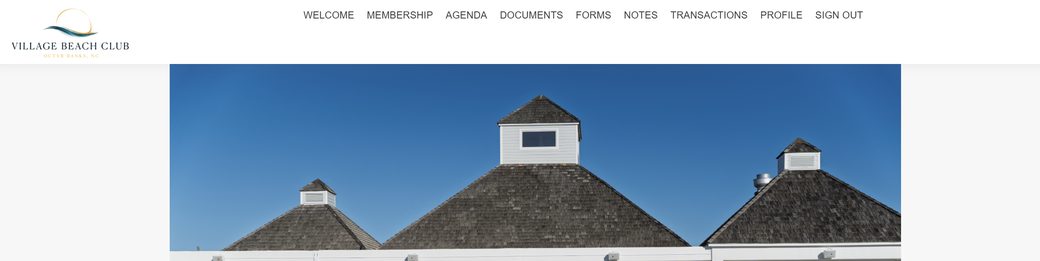
Find your way around the portal
Once you're signed in, you'll land on the Welcome page. A menu runs across the top with everything you need: Welcome, Membership, Agenda, Documents, Forms, Notes, Transactions, Profile, and Sign Out.
|
|
|
|
|
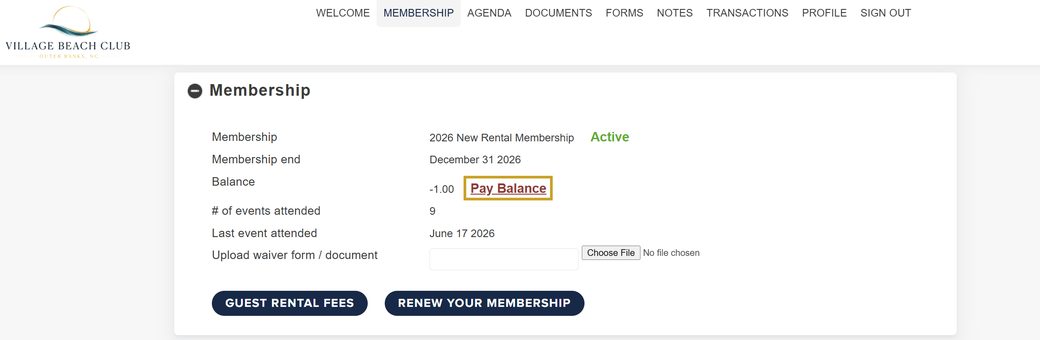
Open Membership and click Pay Balance
Click MEMBERSHIP in the top menu. This page shows your membership type, end date, events attended, and your current Balance. If a balance is owed, click the Pay Balance link next to it.
|
|
|
|
|
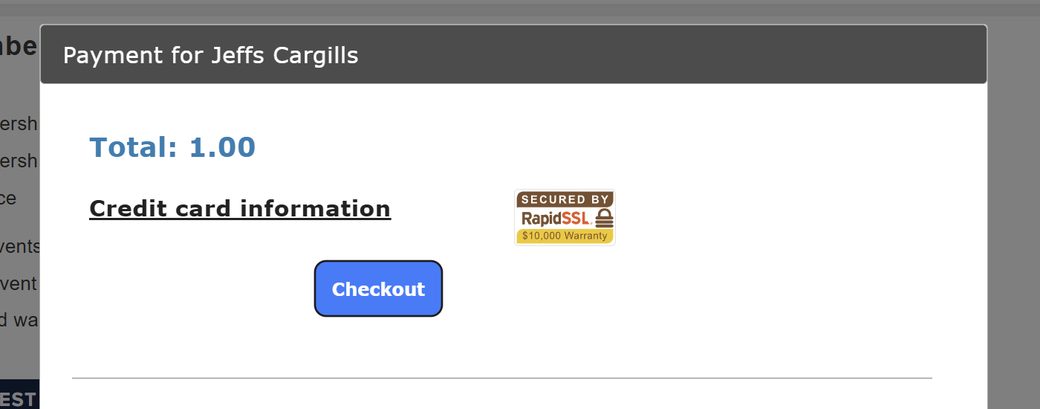
Enter your card and check out
A secure payment window opens showing your total. Enter your credit card information, then click Checkout. When you're finished, click Close to return to your membership page.
|
|
|
|
|
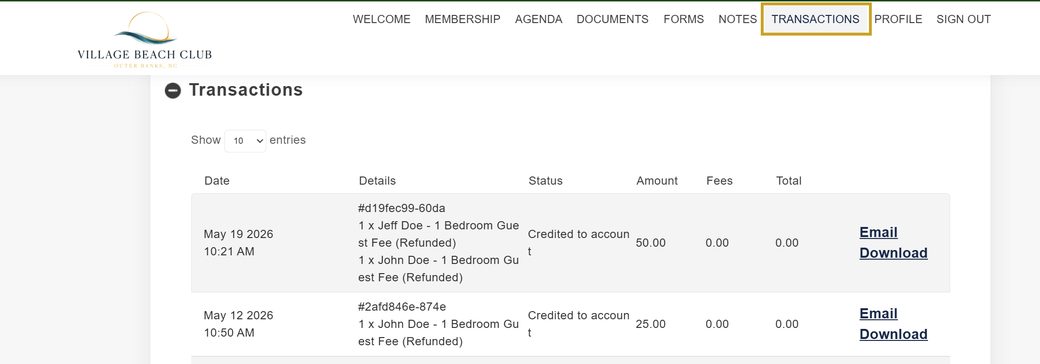
Review your guest fees under Transactions
Click the TRANSACTIONS tab to see every charge on your account, including your guest fees. Each line shows the date, details, status, amount, and total — and you can Email or Download a copy of any transaction for your records.
|
|
|
|
|
|
Log in with the original email address you signed up with.
|
|
Your card on file will be charged August 19
If you'd rather not log in, there's nothing you need to do. We'll process any outstanding guest fees using the payment method already on file for your membership on Wednesday, August 19, 2026, and by the 15th of each month going forward.
Would you prefer to pay online yourself, or need to update the card we have on file? Log in any time before August 19, or email Vbc@vbcobx.com and we'll take care of it.
|
|
|
Questions, or trouble logging in?
Email us at Vbc@vbcobx.com and we'll get you sorted out. If you're not sure which email address is on your membership, let us know and we'll look it up.
|
|
|
While we have you
Gather is open, with a new menu
If it's been a while since your last visit, the kitchen has refreshed the menu and there's plenty worth coming back for. We'd love to see you at dinner — bring the family, bring friends, and let us take care of the evening.
|
|
|